
WhatsApp Business App vs WhatsApp Business API: What's the Difference and Which Should You Choose?
The WhatsApp Business App suits one person replying from a phone, and the API suits teams that need a shared inbox and automation. Compare features, pricing, and coexistence to find the right fit.
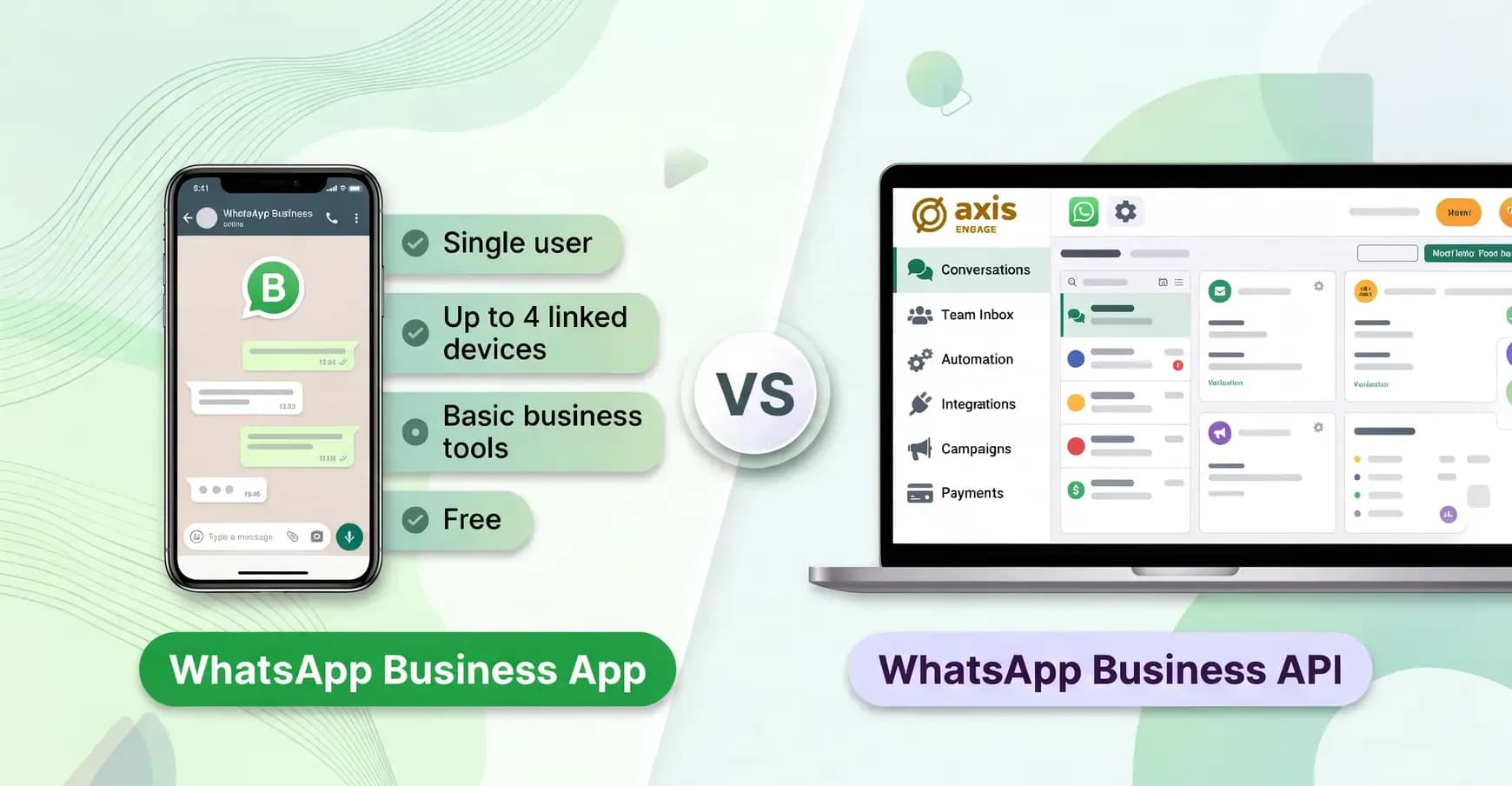
The WhatsApp Business App is a free app that lets a business chat with customers manually, mainly from a phone. The WhatsApp Business API is part of Meta's WhatsApp Business Platform that connects WhatsApp to business software, delivered through Meta's Cloud API. The API has no interface on its own; it only sends and receives messages. Platforms like Axis Engage add a shared inbox, automation, chatbots, CRM integration, and large opt-in campaigns. Meta charges for delivered messages, with a monthly allowance of free replies.
If you run a small shop and answer a few dozen chats a day yourself, the App is usually enough. The API fits better when several people need to answer the same WhatsApp number, when you want to send campaigns to more than a few hundred customers, or when you want replies and payments handled automatically.
Key takeaways:
- The Business App is free to download, built for one owner on a phone and up to four linked devices, with broadcasts limited to 256 contacts at a time.
- Meta charges API users per delivered message, with a small monthly allowance of free replies.
- The WhatsApp API has no interface of its own. Platforms such as Axis Engage add a shared team inbox, AI replies, and M-PESA payments on top of it.
- With Meta's coexistence feature, one number can run on the Business App and the API at the same time, where your provider and number support it.
WhatsApp Business App vs API at a glance
Feature | WhatsApp Business App | WhatsApp Business API |
|---|---|---|
Cost | Free to download; optional paid Meta plans add extras | Meta charges per delivered message, plus your provider's platform fee |
Interface | WhatsApp Business mobile and desktop apps | No Meta app; you use a provider's dashboard or mobile app, or your own software |
Broadcasting | Up to 256 contacts per broadcast list, who must have saved your number | Template campaigns to any opted-in customers, limited by your messaging tier |
Automation | Greeting, away messages and quick replies | Chatbots, AI agents, workflows and routing, added by your provider's software. |
Integrations | None beyond Meta's own tools | CRM, helpdesk, ecommerce and payment systems through webhooks |
Payments in chat | Not available | Possible through a provider, for example M-PESA prompts |
Verification | Meta Verified subscription, where available | Meta business verification, usually required at onboarding; a verified badge is a separate process with its own eligibility rules |
Best for | Sole traders and micro businesses | Growing SMEs, multi-branch businesses and enterprises |
What is the WhatsApp Business App?
The WhatsApp Business App is Meta's free app for small businesses, available on Android and iOS, that works like ordinary WhatsApp with business tools added. You register a phone number, set up a business profile, and reply to customers yourself.
The tools cover the basics a shop owner needs:
- A business profile with hours, address and website
- A product catalogue
- Labels to sort chats
- Quick replies for common answers
- Greeting and away messages
- Broadcast lists
- Simple message statistics
The App falls short when several people need to manage conversations, or you want to reach hundreds of customers. Each broadcast list is limited to 256 contacts who must have saved your number, and auto-replies offer little customisation.
Some extras now cost money. Meta One, launched in September 2026, sells business plans adding more linked devices, team member access without sharing passwords, and broadcast credits to the App, with availability and prices varying by country. These additions extend what the App can do but don't bring the automation, integrations, and team workflows the API offers.
What is the WhatsApp Business API?
The WhatsApp Business API is the programmatic side of the WhatsApp Business Platform: a Meta-hosted service called the Cloud API that lets platforms send and receive WhatsApp messages on a business number. It has no app of its own. Businesses access it through their own developers or, more often, through a Business Solution Provider (BSP), a Meta-approved company that connects businesses to the API, or a platform like Axis Engage that supplies the inbox, chatbot builder, and campaign tools.
Two rules shape how the API works day to day:
- The 24-hour customer service window opens when a customer messages you. During this time, you can send free-form replies like text, images, or documents without a template. The timer resets each time they write again.
- Message templates apply outside that window. You can only start a conversation with a template, a pre-written message Meta reviews and approves before use. Templates are sorted into marketing, utility (order and account updates), or authentication (one-time codes).
You also need opt-in. Meta requires customers' consent before you send messages to protect them from spam. Our WhatsApp campaign compliance checklist covers what counts as valid opt-in.
What are the key differences between the WhatsApp Business App and the WhatsApp Business API?
Beyond price, five practical differences decide which option fits: team access, automation, customer outreach, integrations and setup.
1. How many people can reply from one account?
- On the App, team access is limited. One phone holds the account, and a few staff can join through linked devices. All see the same chats with no assignment or ownership.
- With the API, your provider's platform adds a shared inbox where many agents work at once, with chats routed to the right person or team and a record of who replied.
2. Can WhatsApp Business automate replies?
- The App offers fixed greeting and away messages and saved quick replies.
- Through a provider, the API can run chatbots and AI agents that answer questions, recommend products, book appointments, and hand over to a human when needed, around the clock. When set up well, the AI handles routine questions and still sounds natural to customers.
3. How do broadcasts and campaigns compare?
- The App's broadcast lists stop at 256 recipients and only reach people who saved your number.
- The API sends campaigns to any customer who has opted in, using approved templates, with no 256-contact limit. The cap is your number's messaging tier, the number of customers Meta lets you start conversations with each day, which rises as people engage with your messages. Our guide to warming up a WhatsApp sender explains how to grow it safely.
4. Does WhatsApp Business connect to other systems?
- The App connects only to Meta's own tools, such as your Facebook Page, Instagram and Meta Business Suite.
- The API sends every message to your systems through webhooks (automatic notifications sent to your software the moment something happens), so chats can create CRM leads, trigger order updates from your store, or take payments.
5. How long does setup take?
- The App takes minutes to install and set up.
- The API requires a verified Meta Business account, a provider, and templates approved by Meta. This usually takes from a day to a couple of weeks, depending on how quickly verification goes through.
How much does the WhatsApp Business API cost?
The WhatsApp Business API cost includes two things:
- Meta's fee applies to each message it delivers, depending on the message type and the customer's phone number country. You pay only for delivered messages, never for those customers send you.
- Your provider's fee for the software you use.
What does Meta charge for?
Meta prices four standard message categories per delivered message, and each message carries one charge:
- Marketing templates: promotions, offers and announcements, charged every time.
- Utility templates: order confirmations, delivery updates and reminders, charged per message, with lower rates as volume grows.
- Authentication templates: one-time passcodes, charged per message, also with volume discounts.
- Service messages: free-form replies sent by your team or a third-party chatbot inside the 24-hour window.
Meta also bills a fifth type separately. Replies written by Meta Business Agent, Meta's AI agent, are charged based on the AI processing each uses rather than a fixed rate. If your provider's AI writes the replies, as the AI assistant in Axis Engage does, they count as ordinary service messages.
Which WhatsApp API messages are free?
Fewer than before. Since 1 October 2026, each business phone number gets 1,000 free service messages a month. Meta charges for every service reply after that. The allowance resets monthly and does not roll over. The same change made utility templates sent inside the 24-hour window chargeable, when they had been free until then.
There is one larger free zone. When a customer messages you from a Click to WhatsApp ad on Facebook or Instagram, and you reply within 24 hours, Meta opens a free entry point window lasting up to 7 days. During this time, marketing, utility, authentication, and service messages are all free. Eligible government agencies and non-profits also keep free service messages beyond the 1,000 allowance until the end of 2027.
How much does the WhatsApp Business API cost in Kenya?
Messages to Kenyan numbers (+254) are billed at Meta's "Rest of Africa" rate. On Meta's rate card effective 1 October 2026, that is USD 0.0225 per marketing message and USD 0.004 per utility, authentication or service message.
Here is what a month could look like for a Kenyan business that sends:
Messages | Volume | Meta's charge |
|---|---|---|
Service replies | 5,000 (first 1,000 free) | USD 16 |
Utility templates, such as order updates | 2,000 | USD 8 |
Marketing templates, such as offers | 1,000 | USD 22.50 |
Total | 8,000 | USD 46.50, about KES 6,000 |
That is before your provider's fee and at around KES 130 to the dollar. Utility and authentication rates fall as volume grows, so larger senders pay less per message.
What do providers charge?
Meta's fees are only part of the cost. Providers also charge for their software, usually as a monthly plan per user or per number, and plans differ in what they include, such as AI replies, campaigns or payments. You can see what each Axis plan includes on the Axis pricing page.
Is the WhatsApp Business API worth the cost?
For most growing businesses, yes, once slow or missed chats start costing sales. A Forrester study commissioned by Meta found that large companies using WhatsApp for business earned a 275% return on investment over three years.
The real question is what an unanswered or late reply costs your business, and whether the API would win those sales back.
The same study points to where the returns come from:
- Lead conversion rates rose 55%, helped by fast, personal follow-up.
- Marketing messages on WhatsApp generated 50% more leads than email and SMS.
- Click-to-WhatsApp ads produced 40% more leads than traditional digital ads.
- Agents spent 30% less time resolving each request, thanks to automation.
- Utility messages, such as delivery confirmations and payment reminders, cut failed orders by 15%.
These figures come from large companies in a vendor-commissioned study, so treat them as a sign of what is possible rather than a promise. Test the case for your own business with a quick sum:
- Count the enquiries you lose each month to slow or missed replies.
- Multiply by your average sale and your usual conversion rate.
- Compare that figure with the monthly cost of a provider plan plus Meta's message fees.
If the value of those missed sales is larger than the monthly cost, the API likely justifies itself through recovered sales and time saved. For example, a shop that misses 40 enquiries a month, converts one in four, and earns KES 3,000 per sale misses about KES 30,000 a month in potential sales, well above the cost of an Axis Engage plan, which starts at USD 12 a month.
Can you use the WhatsApp Business App and API on the same number?
Yes, in most cases. Meta's coexistence feature lets one phone number run on the WhatsApp Business App and the Cloud API at the same time, with messages synced between them. Your provider handles setup, starting with a quick check that your number qualifies.
Previously, moving an existing number to the API meant you could no longer use it on the Business App. With coexistence, the owner keeps chatting with familiar customers on the App while the API handles campaigns, automation and the team inbox.
How it works in practice:
- You start onboarding with a provider that supports coexistence and connect an existing Business App number.
- You confirm the connection from the WhatsApp Business App on your phone, usually by scanning a QR code.
- You can choose to share recent chat history and contacts with the provider's platform.
- From then on, chats appear in both places.
Costs are split by where a message is sent. Messages sent from the Business App stay free, while messages sent through the API follow Meta's per-message pricing.
Before you switch, ask your provider:
- How much chat history and which contacts will sync
- Which App features stop working once the number is connected
Which should you choose: the App or the API?
Stay on the WhatsApp Business App if one person handles most chats, you rarely message more than 256 people at once, and customers usually start the conversation. Move to the WhatsApp Business API if any of the signs below apply.
It's time to upgrade to the API when:
- Two or more people need to answer the same number, or chats get lost between staff.
- Customers wait hours for replies, especially at night or weekends.
- You want to send offers, reminders or order updates to hundreds or thousands of opted-in customers.
- You need chats linked to your CRM, online store or payment system.
- You run Click to WhatsApp ads (Facebook or Instagram ads that open a chat with you) and want to follow up leads quickly.
- You need reports on response times and agent performance.
Here are three examples of which option fits:
- A boutique owner who answers 20 chats a day from her phone and posts new stock to a 200-person broadcast list is well served by the App.
- A pharmacy chain with five branches, where staff share one number, and customers ask about stock and delivery all day, needs the API's shared inbox and routing, so stock questions reach the right branch and delivery queries reach the dispatch team.
- A growing online store that started on the App and whose owner still likes chatting with loyal customers is a good example of where coexistence makes sense: keep the App on the owner's phone and add the API for campaigns and the support team.
What about unofficial WhatsApp automation tools?
Some tools send bulk messages or run bots by automating WhatsApp Web or a phone running the ordinary app. They seem cheaper, but WhatsApp's terms do not allow unauthorised automated or bulk messaging, and numbers caught doing it can be banned, taking your customer chats with them. The official WhatsApp Business API is the only supported way to automate WhatsApp at scale.
How do you get the WhatsApp Business API in Kenya?
According to GeoPoll's 2025 smartphone survey, 90% of Kenyans use WhatsApp, making it the country's most-used platform. The API lets businesses turn those everyday chats into organised support, sales and payments.
Kenyan businesses get the WhatsApp Business API through a provider after verifying the business with Meta. The process is the same as anywhere else, with a few local points worth planning for.
What you need:
- A Meta Business account (business portfolio) verified with your registration documents, such as your certificate of incorporation or business registration.
- A phone number for WhatsApp, either a new one or your existing Business App number through coexistence.
- A display name that matches your business, which Meta reviews.
- A payment method on your Meta account for message fees.
- Customer opt-in records, which also matter under Kenya's Data Protection Act 2019.
Most Kenyan businesses also want payments inside the chat. Through the API, a provider connects WhatsApp to M-PESA. The customer receives an STK push, the M-PESA prompt on their phone, enters their PIN, and the payment confirmation appears in the chat. The Business App has no equivalent.
How to choose a WhatsApp API provider and where Axis Engage fits
Look for a provider that offers local payments such as M-PESA, one inbox for all your channels, AI replies that hand over to a person when needed and a mobile app so your team can reply from anywhere.
Axis Engage covers all four, with apps for iOS and Android, and getting started takes a few steps. Here is what it adds on top of the API:
Feature | The WhatsApp API on its own | What Axis Engage adds |
|---|---|---|
Omnichannel | WhatsApp only | One inbox for WhatsApp, Instagram, Messenger, SMS and web chat |
Intelligence | No AI | AI-suggested replies and intent routing, with handover to a person |
Broadcast | Sends approved templates | Segmented, scheduled campaigns with delivery and read tracking |
No-code | Needs developers to build anything | A no-code chatbot builder and ready-made workflows |
Commerce | No payment features | M-PESA STK push and card payments confirmed in the chat |
Teamwork | No inbox or agents | A shared inbox with assignment, transfers and internal notes |
Insight | Raw delivery data through webhooks | Reports on conversations and campaign results |
Axis Engage plans start at USD 12 a month for one user, billed in USD or KES. Meta's message fees are separate from the plan price.
Start a 14-day free trial or book a demo and tell us your chat volume and team size. If the free Business App is enough for now, we will say so.
Frequently asked questions
What is the difference between WhatsApp Business App and API?
The App is a free phone app for chatting with customers manually. The API is Meta's paid service for connecting WhatsApp to business software.
Does WhatsApp Business API have a mobile app?
Not from Meta. You use it through a provider's dashboard or mobile app, such as Axis Engage.
What is Meta's coexistence feature?
Coexistence lets one phone number run on the WhatsApp Business App and the WhatsApp Business API at the same time, with chats synced between them. Your provider sets it up.
Do I need a new phone number for the WhatsApp Business API?
No. You can use a new number or connect your existing Business App number through coexistence.
Keep reading

How to Get More Customers on WhatsApp Business and Turn Chats into Sales
Learn how to get more customers on WhatsApp Business. Promote your number, run click-to-WhatsApp ads, grow an opt-in list and send messages people reply to.
How to Improve Customer Service through Call Deflection to WhatsApp Chatbots
Learn how call deflection to WhatsApp chatbots helps businesses reduce call volumes, deliver faster customer support, and improve customer experiences with Axis Engage.

From “Hi” To “I’ll Take It”: How Conversational Commerce Is Changing The Way We Buy.